Crawl a whole site, read a sitemap, or add a single page, then choose exactly what gets indexed.
Most agents get the bulk of their knowledge from a website. Open Knowledge, select Add, then Website.
Choose a scope
Enter a URL and pick how much of the site the agent should learn from:
- Entire site. Every page we can find, starting from your sitemap and falling back to following links.
- This section only. Just the pages under the path you entered, so
yoursite.com/docsreads your docs and nothing else. This option appears only when the URL has a path. - Just this page. One URL, indexed straight away with no scan step.
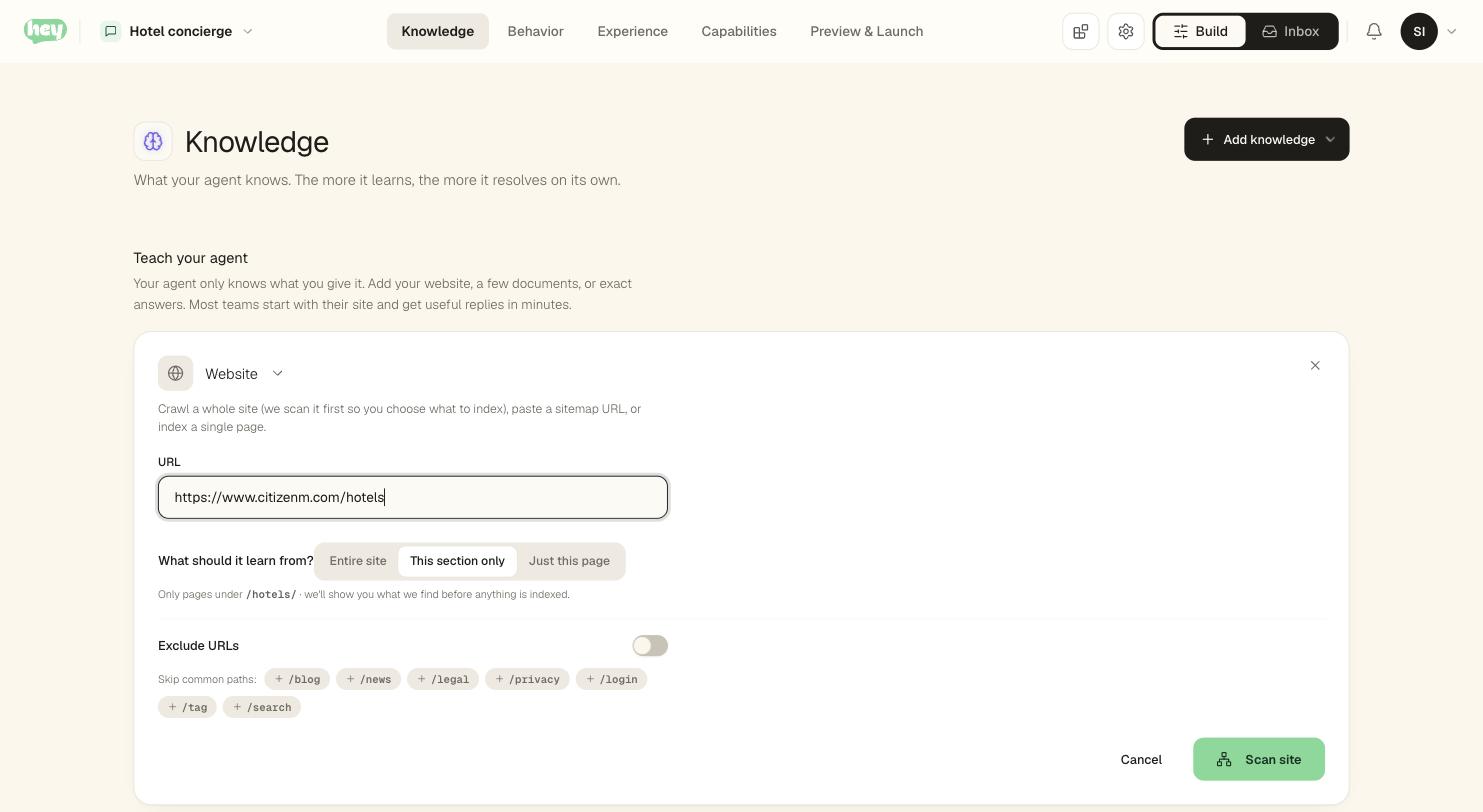
You can also paste a sitemap.xml directly. We read the list of pages from it instead of following links.
There is no page-count setting. You cannot know how many pages your site has before we look, so we look first.
What happens next
Scanning is free and never counts against your plan. What happens after depends on the size of your site.
Small sites just work. If your site comfortably fits your plan, we read it, index it, and tell you what we found. There is nothing to confirm.
Large sites ask first. If your site is bigger than one scan reads, or would not fit your plan, we stop and show you what we found before reading anything:
- The real number. "We found 1,181 pages" — the true total, not a capped one.
- What that costs you. We read a few pages first to measure how much content this particular site puts on a page, then tell you roughly how many pages your plan fits.
- A sensible starting selection. Pages are ranked so the ones a visitor actually asks about —
/faqs,/about,/contact— are picked before the thousandth product listing. Sitemaps often list those last. - Your call. Group by section, filter by path, and check or uncheck in bulk.
Only the pages you keep are read. Nothing is added to your knowledge base until the pages have been read and you confirm what to index.
Other options
- Exclude URLs. Skip sections you do not want, like
/blogor/legal. We suggest common ones to exclude. - How long it takes. Reading pages happens while the tab is open, so we tell you the rough time up front. If you leave, the scan pauses and picks up where it left off when you come back.
When a page cannot be read
Some pages cannot be indexed. The scan tells you why, per page, so you can decide what to do:
| Reason | What it means |
|---|---|
| Not found | The page returned a 404. |
| Timed out | The page took too long to respond. |
| Rate limited | The site asked us to slow down. |
| Unreachable | We could not connect, or a firewall blocked us. |
| Not HTML | The URL is a file or feed, not a web page. |
| No text | The page loaded but had no readable content (often a JavaScript-only page). |
| HTTP error | The server returned an error status. |
| Index failed | We read the page but could not process it. |
Resuming a scan
A scan keeps running in the background. If you close the tab, it pauses, and the scan card picks up where it left off when you come back. Scans expire after 24 hours, and each agent runs one scan at a time.