


What your agent does, and how you stay in charge.

It learns your business from your website and answers on your site, WhatsApp and Telegram. You decide what it says and step in from one Inbox. No code.

15-day free trial. No card. Set up in minutes.

How your agent works

Six things you control, each on its own page. Together they decide every conversation, from what your agent knows to who takes over.

  1. Knowledge

    It answers from what you already have: your site, files and notes. When it doesn't know, it says so.

    • Learns your site, from the pages you pick
    • Reads PDF, Word and Excel files, and Notion exports
    • Gives your exact words for the answers that matter
    • Keeps up with your site, weekly or daily on ScaleGrowth and upIncluded on the Growth and Scale plans, and on Enterprise.
    WebsiteFilesTextQuick answers
  2. Behavior

    Tell it who to be and what to steer clear of, in your own words. It sounds like your own team.

    • Helps with support, sales or qualifying leads, or a role you write
    • Sounds friendly or formal, brief or thorough, as you choose
    • Stays off the topics you rule out, every time
    • Follows your steps when a set situation comes up, like a refund
    RoleVoiceInstructionsGuardrailsPlaybooks
  3. Appearance

    It looks like it belongs on your site, in your colour, and talks to each visitor in their language.

    • Three looks to choose from, in your colour, light or dark
    • A welcome screen with the links and questions you choose
    • Replies in your visitor's language, 28 of them
    • Your brand alone, with ours taken offGrowth and upIncluded on the Growth and Scale plans, and on Enterprise.
    Brand colourCleanGlassSmokeChat buttons
  4. Capabilities

    Switch on what it should get done in the chat, from booking a meeting to finding an order.

    • Books meetings on Google Calendar or Cal.com
    • Sells from your Shopify or WooCommerce store, cart and all
    • Finds an order and changes its address, on WooCommerceGrowth and upIncluded on the Growth and Scale plans, and on Enterprise.
    • Opens a ticket when it can't solve somethingGrowth and upIncluded on the Growth and Scale plans, and on Enterprise.
    • Checks your own systems mid-chat, through your APIGrowth and upIncluded on the Growth and Scale plans, and on Enterprise.
    LeadsMeetingsStoreOrdersTicketsYour API
  5. Channels

    Your customers get the same help wherever they reach you: your site, WhatsApp or Telegram.

    • Answers visitors on every page, from a corner bubble or an ask bar
    • A Help page to link from your emails, receipts and QR codes
    • Handles customer chats on WhatsApp, around the clockGrowth and upIncluded on the Growth and Scale plans, and on Enterprise.
    • Does the same on Telegram, through your own botGrowth and upIncluded on the Growth and Scale plans, and on Enterprise.
    BubbleCenter stageHelp pageWhatsAppTelegram
  6. Inbox

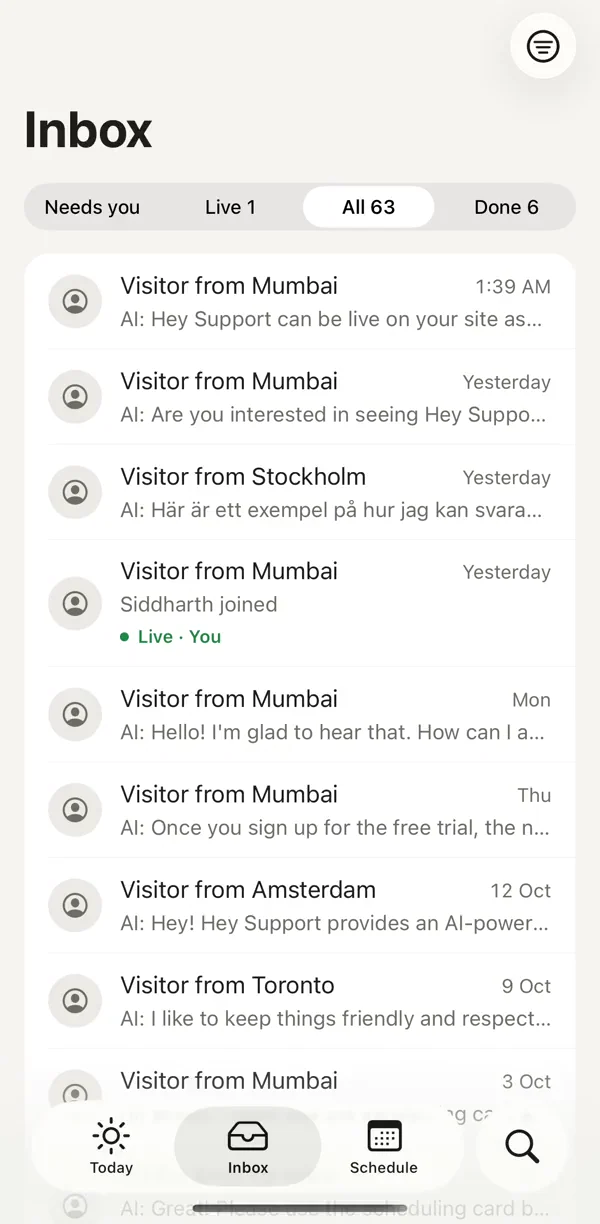
    Every chat, lead and ticket in one place, so your team can step in from the web or their phone.

    • Website, WhatsApp and Telegram chats in one list
    • Take over any chat the moment it needs youGrowth and upIncluded on the Growth and Scale plans, and on Enterprise.
    • Notes, tags and saved replies for your team
    • Reply from the app for iPhone and Android
    TodayInboxTicketsLeads

Paste a link. Get an agent your customers can message.

Nothing to write and no code. It starts from what your site already says, and you can change any of it later.

  1. 1Paste your websiteIt learns your business from the pages you already have.
  2. 2Ready to answer your customersIt answers from your pages, and says so when it doesn't know.
  3. 3Let it do more than answerSwitch on meetings, your store, leads and tickets.
  4. 4On your websiteOne line of code, or the WordPress plugin.
  5. 5The same agent on WhatsApp and Telegram.Customers reach you on the app they already have, with nothing to download. Every conversation lands in one Inbox for your team.

Rather do it together? Book a free 30-minute setup call.

What it does in a conversation

The real chat, playing the conversations your customers have. Every reply comes from your pages, your calendar and your store.

Answers with its source

The source under every answer, and "I don't know" when it isn't covered.

Takes leads and books meetings

It takes contact details as people talk, and books time in your calendar.

Helps people shop

Live products and prices, and a cart that is ready to pay.

"Where is my order?"

Answered from the order number and the email on it. WooCommerce, on Growth and up.

Hands over to your team

To your email or live in the chat, with the whole conversation.

Opens a ticket

A number they can quote, and a reply time from your own hours. Growth and up.

Where your customers find it

On your site in the style that suits the page, on a link of its own, and in the messaging apps your customers already use.

Chat bubble

The chat in the corner of every page

Center stage

An ask bar that opens into a wide chat

Help page

A page of its own, to share as a link or QR code

WhatsApp

Answers your customers day and night, on Growth and up

Telegram

The same help through your own bot, on Growth and up

A booking button

One line of code on any page. It books the meeting right there.

Run it from one Inbox

You see the conversations that need a person, and nothing else. Every chat, lead and ticket, in one place.

Every chat in one Inbox

Site, WhatsApp and Telegram in one list. Step in with a click.

Tickets

Each one due by the time your agent promised. Draft the reply with AI.

Leads

Every lead with the conversation it came from, from new to won.

Who is on your site now

See which page each visitor is on, and start the chat yourself.

On your phone

An alert when someone needs a person. Reply from the app.

It gets better every week

Every conversation shows you what to teach it next, and you teach it in the same place you built it.

  • What it couldn't answer

    Questions grouped, with the page that might hold the answer.

  • Fix answers in place

    A reply marked unhelpful becomes a better answer in one step.

  • What people ask most

    How many chats, your busiest hours, how they ended and the questions that come up most.

  • Asks if it helped

    Once, as a chat ends, so you hear it from customers and not from us.

Works with the tools you already run.

Connect your store, your calendar and your team, and it can look things up and get things done, inside the limits you set.

  • One line of code on any website
  • Works on Shopify
  • One-click install on WordPress
  • Works on Webflow
  • Works on Squarespace
  • Works on Framer, in beta
  • Books into Google Calendar
  • Tells your team in Slack
  • Products and carts from WooCommerce
  • Books with Cal.com
  • Emails you each new lead
  • Sends leads to Zapier, in beta
  • Webhooks and an API for your developer
  • Reply from the iPhone and Android app

See every integration

Your data stays yours.

Your content never trains AI models. Your GDPR agreement comes signed. You can delete anything, any time.

  • GDPR agreement, already signedThe data processing agreement GDPR asks for, already signed on our side.
  • Covered across bordersStandard contractual clauses for the EU, UK and Switzerland cover every transfer.
  • Never trains AI modelsYour chats and content stay out of model training.
  • Encrypted, moving and storedSent over HTTPS and stored encrypted.
  • Says it is an AIEvery chat is labelled, as the EU AI Act asks.
  • Delete any timeErase a person's data, or your whole workspace.

Every feature, plan by plan.

What each plan includes, side by side, with the limits.

Compare plans

Features, answered

No. Paste your website address and it reads your site. To put it on your site, paste one line of code, or install the WordPress plugin. If you'd rather do it together, book a free 30-minute setup call.

Your customers are asking right now.

15-day free trial. No card. Set up in minutes.